Smart Kitchen Decor 2026: Making Your Kitchen Actually Smart (and Beautiful)
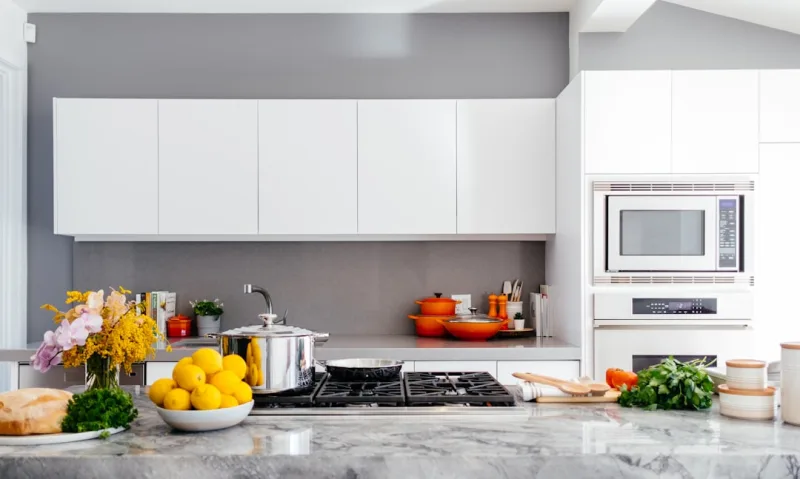
Look, I've been doing kitchen makeovers for over a decade now, and I've got to tell you — the kitchen in 2026 isn't just about granite countertops and stainless steel appliances anymore. It's about creating a space that actually works with you, not against you. Smart kitchen decor has evolved into something genuinely practical that doesn't make your space look like a sci-fi movie set.
Here's the thing about smart kitchens in 2026: they're finally hitting that sweet spot where technology and aesthetics actually coexist peacefully. We're talking about integrated systems that make your life easier while keeping that warm, inviting kitchen vibe you actually want to hang out in. Whether you're a gadget person or someone who just wants their kitchen to be a little less chaotic, there's something here for you.
I'm going to walk you through everything — from the essentials you'll need to pull this off, to the nitty-gritty of installation, to real talk about whether this is worth your budget. Because honestly, not every trend is worth the investment, but this one? I think you'll be genuinely surprised at how transformative it can be.
What You'll Need
Before you start shopping, let's talk about the actual materials and gadgets that make a smart kitchen work in 2026. This isn't about buying everything at once — think of it as building your system over time.
- Smart Lighting System (LED strips, color-changing bulbs) — $150-$400. I recommend checking out The The Home Depot for Philips Hue options.
- Smart Display/Hub (Amazon Echo Show, Google Nest) — $80-$250. This is basically your kitchen's command center.
- Smart Backsplash or Accent Lighting — $200-$600. These modular strips are game-changers for ambiance.
- Voice-Controlled Faucet — $300-$700. Yes, they exist, and yes, they're worth considering if you're doing a reno.
- Smart Storage Solutions (sensor-based organizers, smart shelving) — $100-$400.
- Wireless Charging Kitchen Counter Insert — $80-$200. Perfect for phones and small devices.
- Smart Appliance Connectivity Module (for existing appliances) — $50-$150.
- Professional Installation Services (if needed) — $200-$500.
- Paint or Wallpaper for Smart Aesthetic — $40-$150. You'll want cohesive, neutral tones.
- Cable Management and Wiring Supplies — $60-$150.
Step-by-Step Guide
Step 1: Plan Your Smart Kitchen Layout
Don't just dive in and start installing things. Seriously. Spend a solid weekend mapping out where everything goes. Walk around your kitchen at different times of day. Notice where you actually spend time, where you prep food, where you eat. That's where your smart features should go. I usually sketch this out on graph paper — old school, but it works. Think about which walls get natural light, where shadows hit, and where outlets are located. Your smart lighting should complement what you're already working with, not fight against it.
Step 2: Install Your Central Smart Hub
Your hub is ground zero. This is typically a smart display or speaker that controls everything else. Mount it somewhere accessible but not in the main visual path of your kitchen — a corner of the counter or a small wall space works perfectly. Make sure it has power nearby, obviously. The Home Depot can help you figure out if you need an electrician for this, but honestly, most people can handle plugging it in themselves. Connect it to your Wi-Fi, set up your account, and customize the voice assistant settings. This takes about 30 minutes.
Step 3: Integrate Smart Lighting
Here's where things get fun. LED strip lighting is the easiest entry point. Install strips along the underside of your upper cabinets — the ambient light this creates is absolutely lovely and incredibly functional for food prep. Use a stud finder to ensure you're not drilling into anything important, then secure the strips with the adhesive backing. Connect these to your smart hub via Bluetooth or Wi-Fi, depending on your system. Test everything before you move on. HGTV has some fantastic examples of how to make this look intentional rather than trendy.
Step 4: Set Up Smart Storage Organization
This is the underrated part of smart kitchen design. Install sensor-based organizers in your pantry and cabinets. These little gadgets track what you have and notify you when you're running low on essentials. Sounds gimmicky, but once you have it? You'll never go back. Position the sensors where they'll get good signal from your hub, and organize your storage so the most-used items are in sensor-covered areas.
Step 5: Add Voice-Controlled Features
If you're not doing a full kitchen renovation, don't worry about the smart faucet. Instead, focus on voice-controlled features you can add to your existing setup. A smart display becomes your recipe station, your timer, your grocery list keeper. Set up routines so that saying "Hey, I'm cooking dinner" dims your lights to a warm setting, pulls up a recipe, and starts background music. These routines are where the magic happens.
Step 6: Wire Everything Together Thoughtfully
Cable management matters here. You don't want cords draped all over your kitchen counters — that defeats the whole "smart and modern" aesthetic. Use cable clips, run wires behind cabinets when possible, and use wireless charging options where you can. This step takes time, but it's what separates a truly smart kitchen from a kitchen that looks like a tech convention.
Step 7: Test All Systems and Troubleshoot
 Budget Apartment Renovation: DIY Hacks That Actually Work
Before you consider this done, spend at least a week using everything. Is the lighting responsive? Does your voice assistant hear you from across the kitchen? Are the sensors working? Identify any hiccups now, while you still have time to adjust. Better Homes & Gardens & Gardens actually has some solid troubleshooting guides if you hit any snags.
Pro Tips
Go neutral on big purchases. Choose white, cream, or matte black finishes for your smart devices. They're timeless and won't clash with whatever design direction you take your kitchen next. Trust me, by 2027, technology will look different, and you don't want your fixtures to already look dated.
Invest in a quality hub first. Everything else connects to this, so don't cheap out. A $150 hub is better than three $50 gadgets that don't talk to each other properly.
Start with lighting and storage — these are your biggest visual and functional wins. Fancy faucets are nice, but good light and organized cabinets change how you actually feel in the space.
Honestly? Don't feel pressured to go all-in. Some people just want smart lighting and a central display. Others want the works. There's no "right" version of a smart kitchen — there's just the version that works for your actual life.
Keep all your receipts and warranty information in one place. Smart devices occasionally need updates or troubleshooting, and you'll want to know exactly what you own and when you bought it.
Cost Breakdown
← Scroll to see full table →
| Item | Low Cost | Mid Range | Premium |
|---|---|---|---|
| Smart Lighting | $150 | $250 | $400 |
| Smart Hub/Display | $80 | $150 | $250 |
| Backsplash Lighting | $200 | $400 | $600 |
| Smart Faucet | $300 | $500 | $700 |
| Storage Solutions | $100 | $250 | $400 |
| Wireless Charging Insert | $80 | $140 | $200 |
| Installation Services | $0 | $300 | $500 |
| Paint/Finishing | $40 | $100 | $150 |
| Total Estimate | $950 | $2,090 | $3,600 |
FAQ
Do I really need all these smart features, or is this just hype?
Honestly? Start with smart lighting and a hub. Those two things actually improve your daily kitchen life. The rest is additive. Some people will never use a smart faucet, but everyone benefits from better lighting and voice control for timers and recipes. It's not hype if it genuinely makes your mornings easier.
What if I rent and can't install permanent fixtures?
Perfect question. Smart lighting strips, removable backsplash options, and portable hubs all work great for renters. Skip the voice-controlled faucet and focus on things you can take with you. Your next place will thank you.
How long does a typical smart kitchen setup actually last before it feels outdated?
The good news is that smart kitchen basics — light and control — are pretty timeless. The bad news is that specific devices might not get updates after 5-7 years